Choosing an app
Choose a recipe organizer app for your iPhone
A practical way to compare recipe apps by what you actually save, find and cook.
 By Salsa
THE SHORT ANSWER
The right iPhone recipe organizer depends on what happens after you save a recipe. Check whether it can take recipes from your real sources, keep the original, help you find a dish later and show the steps clearly while you cook. Then check its device support and payment model. Try those tasks with your own recipes before committing to an app.
Recipe apps often share a similar promise: keep everything in one place. The useful differences show up when a website import misses a step, a cookbook photo is hard to read, or you want ingredient amounts visible beside the instruction. Start with your cooking habits, then compare the tools.
We make Salsa, so this is a vendor-written guide. The comparison below uses each product's public description as of 6 November 2026. We have not independently tested the other apps or ranked a universal winner. Features, availability and prices can change; check the linked product pages before choosing.
Choose by the job, not the feature count
Write down where your next five recipes will come from: websites, a handwritten card, a cookbook photo, your own notes or a saved link. A long feature list matters less than handling the sources you already use.
| What you need | What to check |
|---|---|
| Bring recipes in | Can you add a full website recipe, text or a readable photo? What happens when details are missing? |
| Find them again | Can you search by a name or ingredient and keep favourites or useful categories? |
| Cook from them | Are the current step and ingredient amounts easy to see? Are timers useful without hiding the method? |
| Use your devices | Is the app available where you cook and plan, such as iPhone, iPad, Android or desktop? |
| Understand the cost | Which tasks work free, which need payment, and what happens to saved recipes if you stop paying? |
If you mainly need a method for arranging recipes already on your phone, our organization guide covers that workflow. This page helps you choose the app first.
Three different approaches to a recipe collection
These examples show why one feature checklist cannot choose for everyone. They are summaries of official descriptions, not claims that we tested how each app performs with the same recipes.
| App | Published emphasis | Device and access point |
|---|---|---|
| Salsa | Imports links, text and photos into a collection, then offers guided steps, ingredient amounts, serving changes and timers you start yourself. | iPhone only. Three free lifetime imports; further import capacity and Salsa AI are part of Pro. Saved recipes remain available after Pro ends. |
| Paprika Recipe Manager 3 | Website recipe downloads alongside grocery lists, pantry, meal planning, categories, scaling and cooking timers. | The iPhone listing also names iPad and Apple Watch. Paprika says versions on other platforms are sold separately; confirm your local App Store price. |
| Recipe Keeper | Collecting website and photographed recipes, with a shopping list, meal planner and sharing tools. | Its site lists iPhone, iPad, Android, Windows and Mac. Check its current free and paid limits in your store. |
If grocery planning or a pantry is your main need, investigate apps that describe those tools, such as Paprika or Recipe Keeper. If you want a recipe kept beside clear cooking steps on an iPhone, try Salsa's cooking flow. If your household needs Android or desktop access, Salsa's current iPhone-only availability is a decisive limitation.
Run a small, honest trial with your own recipes
Choose a normal website recipe, a photo or scan you have permission to use, and one dish you cook often. For each candidate app, try the same sequence:
Add the recipe
Use a complete source. Note whether the app keeps the original link and asks for more information when the source is incomplete.
Check the import
Compare servings, every ingredient amount, oven temperature, timing and method against the source. A polished card is not proof that the import is correct.
Find it again
Close the app. Return later and search for a title or ingredient. Check whether your collection makes sense without remembering which folder you used.
Cook one familiar dish
Keep the current instruction visible and see whether you can find the amounts and start a timer at the right moment. Do not treat an app's timer as proof of food safety or doneness.
Check the payment boundary
Look at the exact plan and local price shown to you before subscribing or buying. Confirm what you can still open and cook if you do not pay later.
If you are starting with a website recipe, our iPhone website-import guide has a more detailed source-checking list. The point of the trial is not to crown a winner from a marketing page; it is to see which app fits your actual recipes.
Where Salsa fits
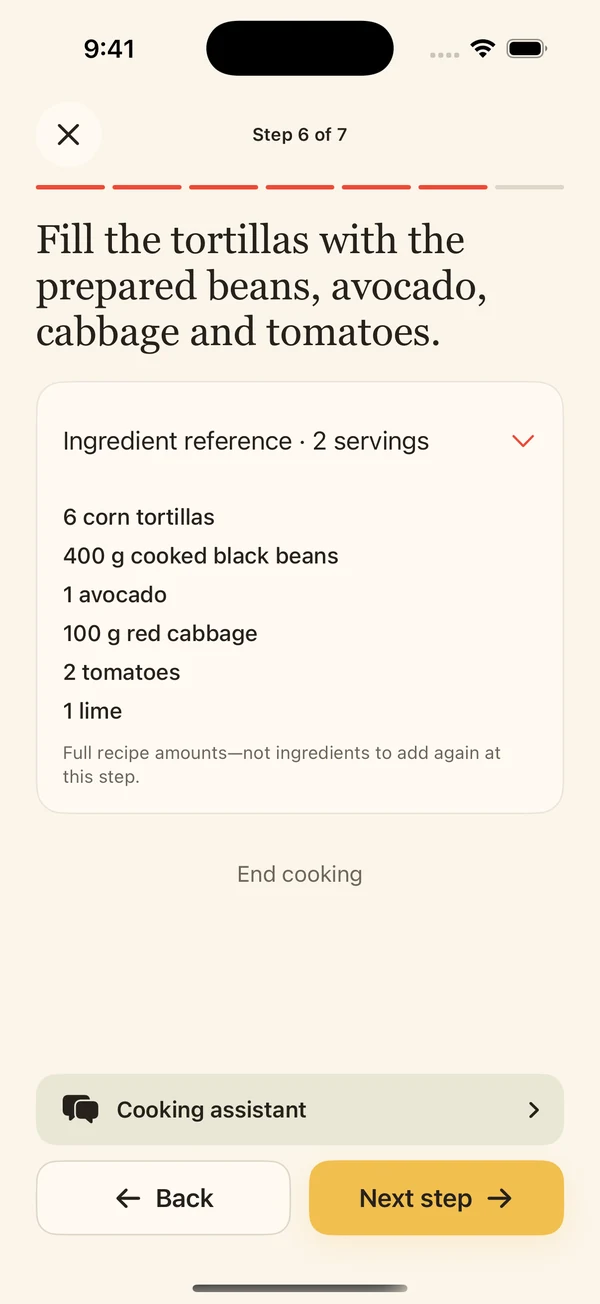
Salsa is built for the step after collecting: cooking a saved recipe. Its current App Store listing describes guided instructions, ingredient amounts, serving adjustments and manually started timers. You can try three lifetime recipe imports free, keep cooking saved recipes without Pro, and see current Pro limits and local pricing in the app.
Salsa is currently iPhone only. It does not replace a shopping-list or meal-planning app if those are the tools you need most. It can also miss details in an import, so compare important quantities and safety instructions with the original source.
Common questions
Is a free recipe organizer app enough?
It can be if its free allowance covers the recipes you need and you can still find and cook them. Check import limits, device support and what happens to your collection if you do not upgrade. Salsa currently offers three free lifetime imports and continued access to saved recipes and standard cooking tools without Pro.
Can I move every recipe from websites into an app?
No app can guarantee that. A page may be private, blocked, incomplete or ambiguous. Keep the source link and check imported ingredients and steps before cooking.
Should I choose the app with the most features?
Choose the one that handles your sources, helps you find a recipe later and feels clear while you cook. A pantry or planner matters when you use it; it need not decide the choice for every cook.
Sources and scope
- Salsa: Recipe Manager — NZ App Store listing and version 1.1.4 notes
- Paprika Recipe Manager 3 — App Store listing
- Recipe Keeper — official product site
Product descriptions were checked on 6 November 2026. No hands-on comparison, performance test or price ranking is claimed.